A bad sector/block is an inevitable problem to hard drives, which can be logical or physical. What we need to be aware of is that bad sectors do not mean the end of hard drive’s lifespan. Hard drive with bad sectors is able to turn healthy or prolong lifespan as long as we deal with it in the proper way.
Symptoms when hard drive gets bad sectors:
You need to be cautious and check bad sectors when hard drive gets abnormal symptoms, for example, hard drive has strange noises, formatting or partitioning can’t be performed, errors appear when running certain applications, etc.
- The normal friction sound made by hard drive turns to weird noise;
- Operating System fails to normally boot and hard drive reports errors such as “Sector not found”, “General error in reading drive C” in the case of ruling out virus attack;
- When reading files or running programs, hard drive reports errors like “read disk error”, “file is corrupted”, etc.
- Blue screen;
- Hard drive formatting can’t be completed;
- The FDISK command can be finished, such as, it keeps exiting;
- Operating System can’t boot from your hard drive, which can boot from floppy.
Steps of checking and repairing bad sectors/blocks:
Here we use DiskGenius Free Edition, a free bad sector checking and repairing tool, to carry out the task.
First, get the program started, and then select the hard drive you want to check bad sectors and click the item “Verify Or Repair Bad Sectors/Blocks“, as shown in the picture: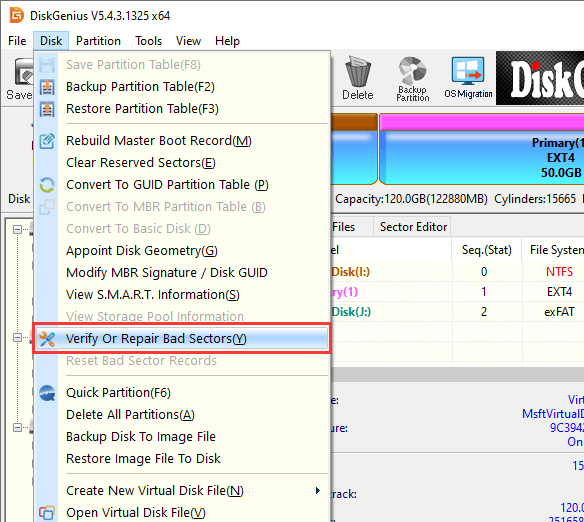
Then, click the “Verify” button to check bad sectors. When the checking process is done, you can click the button “Repair” to repair bad sectors.
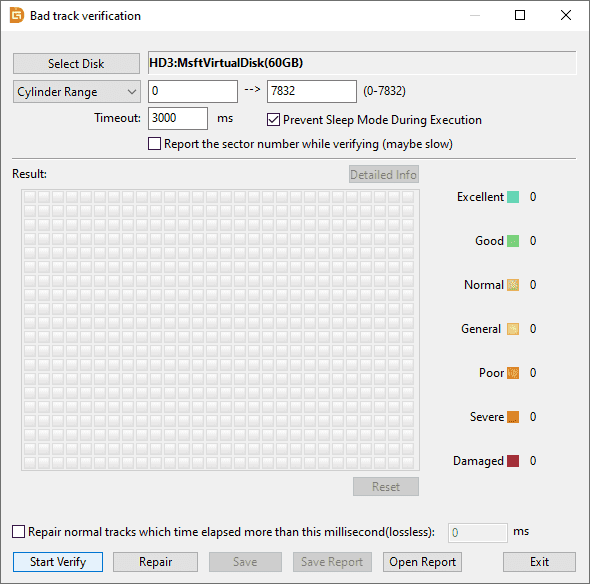
Note: Bad sector repairing will damage data on and near bad sectors. Thus, if there are important files on the hard drive, you need to back up files or perform data recovery before repairing bad sectors.
More information about bad sectors
1. Why does a hard drive get bad sectors?
Various reasons may cause bad sectors, for instance, hard drives have quality problems, improper maintenance, inappropriate use, sudden outage, etc. So, we should take care of hard drives.
2. Types of bad sectors
Usually, bad sectors are classified into two types: logical and physical. Logical bad sectors can be repaired, while it is hard to get physical sectors repaired.
3. What should we do when hard drive gets bad sectors?
Bad sectors should be repaired as soon as possible; otherwise more bad sectors may come up, which is like a vicious circle. What’s more, it is not advised to store important files to the hard drive even if its bad sectors are repaired, for it is more risky of getting bad sectors than those healthy hard drives.
Read more:
Can You Use a Hard Drive with Bad Sectors? How to Check Its Health?
SSD Bad Sectors: How to Check and Repair?