The most recent version of DiskGenius, 6.1.1.1742, is mostly about making the features that people use every day better. At first glance, it doesn’t seem like much, but once you start using it, you might notice that some things are faster, smoother, and more reliable. A lot of these changes are based on things that users have been doing for a long time, especially when they were working with older drives or a lot of files.
Here’s a closer look at what’s new, what’s been fixed, and how these changes might affect how people use the software in real life.
Better ways to recover files
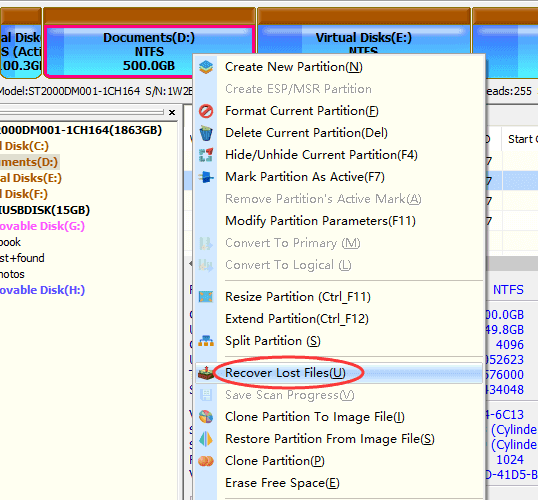
In this version, file recovery got a lot of attention. One of the most useful changes is that SSDs can scan faster. It doesn’t cut scan time in half right away, but it does feel faster now, especially when the drive is full of fragmented or system-related data.
Another small but surprisingly useful change is that the “Search for Known File Types” mode can now run by itself. Before, you had to run it with the regular scan. If you know the file system is really messed up or missing, you can skip right to searching by type. This saves time and makes the work flow more flexible. We also looked at common file systems again. On FAT32, the accuracy of recovery has gotten better, so fewer files are found to be corrupted after the scan. A bug that could have stopped recovery on EXT4 has been fixed, so Linux partitions should now act more predictably.
There was also a long-standing problem where trying to recover certain file types (MTS, DEX, TIFF) created too many files that couldn’t be used. That problem should be over now.
Copying files is faster and less of a hassle. When Things Don’t Go Right
The file copy feature also got faster. You might notice that big folders move a little faster, depending on your system and drive. This is especially clear on drives with a lot of small files, where even a small improvement can make the process seem less boring.
A more useful fix has to do with how the software handles files it can’t read. In older versions, DiskGenius could stop the whole thing from working. It doesn’t give up as easily now. It skips the file that is causing problems and keeps copying everything else. You know how annoying it is when old external drives randomly give you read errors? That’s why this change is important.
Another thing to note is that DiskGenius can now find the real physical disk that is behind a virtual disk that is mounted on a system. This is helpful for tasks like copying files or cloning disks, where you really want the software to know what hardware it is working with. It also makes it less likely that you’ll get a virtual disk mixed up with a real one, which could cause problems. You should also feel more sure about cloning and moving your system. A few rare but annoying failure scenarios were fixed, and the whole process works more reliably on different setups.
Further Reading: 7 Ways to Recover Deleted Files from USB Flash Drives in Windows 10/11
This version also has some changes to the user interface. For instance, when you were choosing files to recover, pressing the Spacebar sometimes caused a noticeable delay. This has been fixed, and the selection now feels instant. There were also some fixes made to problems with how the context menu shows up. These aren’t big changes, but they get rid of little things that tend to get in the way of work.
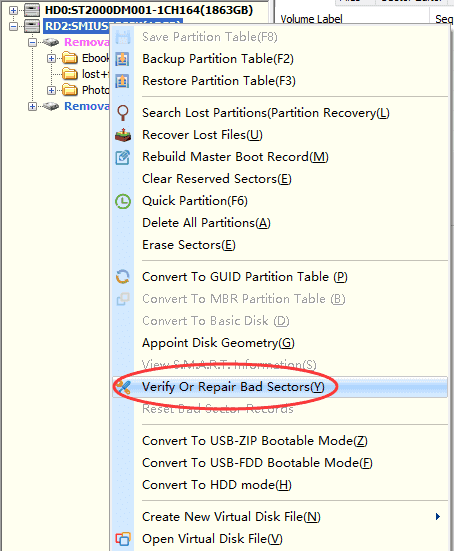
Exporting reports has also gotten better. The File Copy tool and the “Check Or Repair Bad Sectors/Blocks” feature can both now send reports straight to Excel. This may not sound exciting, but it means you don’t have to format plain text logs by hand when you check on the condition of a drive or write down results. It can save you a lot of time to be able to open everything in Excel neatly.
This update doesn’t add any new modules or make big changes to the UI. Instead, it works on making what is already there better. These changes add up: faster recovery scans, better handling of read errors, smoother file selection, and no more strange exceptions from EXT4 partitions.
Sometimes, it’s these small changes that make a tool seem more reliable. The workflow in DiskGenius 6.1.1.1742 is a little easier than it was before, whether you’re recovering lost documents, copying files from a failing drive, or getting ready to move your system. It’s the kind of update that makes things better without making a big deal out of it.
This version is worth getting if you already use DiskGenius to recover files or manage disks. It just works better.